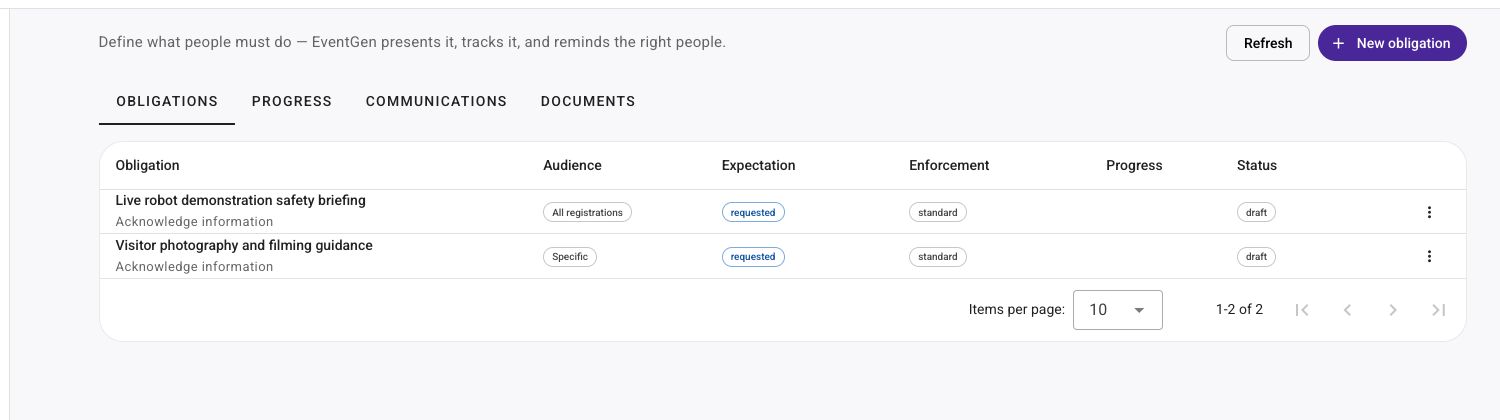
Automate every obligation from request to assessment.
Manage every form, document, payment, wishlist, and organiser-defined task end to end. EventGen requests the work, sends Campaign-backed reminders, tracks it through submission, and can assess uploaded documents against your policy.
An obligation is anything someone needs to complete
Event work rarely arrives in one format. A speaker needs to complete a form. An exhibitor needs to upload insurance and pay for power. A hosted buyer needs to create a wishlist. Obligations bring all of that work into one system instead of leaving organisers to reconcile inboxes, spreadsheets, payment records, and campaign lists.
Forms
Collect speaker details, stand requirements, travel information, or any other structured response.
Documents
Request insurance certificates, risk assessments, agreements, stand drawings, or other files.
Payments & invoices
Track a fee, balance, order, or issued invoice through to payment, including automatic due-date follow-up.
Wishlists
Make completing networking preferences part of the managed event workflow instead of a separate chase.
Acceptances
Ask people to read and accept terms, manuals, policies, briefings, or other required information.
Your own tasks
Define the obligation your event needs, choose the appropriate enforcement, and manage it alongside everything else.
What EventGen takes off your plate
The value is not another checklist. It is the work EventGen removes.
Obligations connect the action, the people, and the communications. For uploaded documents, they also connect the review policy. Your team sets the rules and level of automation. EventGen runs the repeatable work around them.
Campaign communications that stay aligned
Link published Campaign templates to the initial announcement and reminder roles. After you preview and activate them, EventGen manages the schedule and resolves the live audience again at delivery.
People who have fulfilled the obligation or are awaiting organiser review drop out
Newly eligible people can enter without rebuilding a reminder list
Schedules can stop once fulfilled, and can be paused, resumed, or sent a one-off catch-up
AI document review at your chosen level
For uploaded-document obligations, define the evidence rules and confidence thresholds once, then decide how far the AI is allowed to go.
Use assessment-only when your team wants the recommendation but keeps the decision
Enable auto-approve, auto-reject, or both for safe, high-confidence outcomes
Uncertain or unsafe evidence always falls back to a human reviewer
Set it up once
The right request, the right people, the right follow-up
01
Define the obligation
Choose what needs to be done, when it is due, and the level of enforcement that fits the task.
02
Choose the audience
Target the registrants, exhibitors, speakers, sponsors, suppliers, or other group that needs to act.
03
Connect communications
Choose published Campaign templates for the initial announcement and reminder roles, then preview and activate them.
04
Track and assess
Monitor progress in one place and, for uploaded documents, choose how much of the review AI should automate.
Invoice Payment Reminders
Let each unpaid invoice follow up from its own due date
When invoice reminders are enabled, every newly issued invoice gets its own payment obligation and reminder schedule. EventGen snapshots the due date, waits through your reconciliation grace period, and then uses your editable Campaign to follow up while that invoice remains unpaid.
Set inherited invoice payment terms; each invoice keeps the due date captured when it was issued
Choose a reconciliation grace period, reminder cadence, and maximum number of follow-ups
Reuse one editable Campaign while EventGen resolves the right invoice number, due date, amount, and PDF
Mark the invoice paid to fulfil its obligation and stop its future reminders; cancellation stops them too
Build the request
Start with the action EventGen needs to manage
AI-assisted assessment
Let AI handle the clear-cut document reviews
For an uploaded-document obligation, define the rules and confidence thresholds that matter to your event. Choose assessment-only, automatic approval, automatic rejection, or both. EventGen applies the safe, high-confidence results and leaves uncertain, incomplete, stale, or suspicious cases with a human reviewer.
Define rules and confidence thresholds for each uploaded-document requirement
Choose assessment-only, auto-approve, auto-reject, or both
Require explicit confirmation before an automatic policy is activated
Keep uncertain, incomplete, stale, or suspicious evidence in human review
EventGen AI
Your criteria drive the decision
Obligation
Submit public liability insurance certificate
Organiser-defined criteria
Named exhibitor, valid event dates, and required level of cover
AI-assisted result
Accepted. The submitted evidence meets the configured criteria
Obligations Management FAQ
What is an event obligation?
An obligation is anything an attendee, exhibitor, speaker, sponsor, supplier, or another participant needs to complete for your event. It can be a form, document submission, payment, order, wishlist, acceptance, or another organiser-defined task.
Can different obligations have different enforcement levels?
Yes. The organiser chooses the enforcement level for each obligation, so a useful request does not have to be treated in the same way as a critical requirement.
How do obligation reminders work?
The organiser links published Campaign templates to the initial announcement and reminder roles, previews the live audience, and explicitly activates the communication. EventGen then rechecks eligibility at delivery, so fulfilled and awaiting-review people drop out, newly eligible people can enter, and configured schedules can stop once the obligation is fulfilled.
Can EventGen automatically chase unpaid invoices?
Yes. When Invoice Payment Reminders are enabled, every newly issued invoice gets a separate payment obligation and schedule based on the due date captured when it was issued. After a configurable reconciliation grace period, EventGen sends the selected Campaign on the configured cadence while the invoice remains unpaid, up to the organiser's maximum number of reminders. Marking that invoice paid, or cancelling it, stops its future reminders.
Does EventGen assess submitted documents?
Yes. For uploaded-document obligations, organisers define rules and confidence thresholds, then choose assessment-only, automatic approval, automatic rejection, or both. Uncertain, incomplete, stale, or suspicious evidence remains with a human reviewer.
Can I monitor completion across the audience?
Yes. Organisers can monitor progress and see which people are outstanding, which obligations have been submitted, and which have been accepted or rejected.
Is Obligations Management only for exhibitors?
No. The Exhibitor Zone is one important use case, but obligations can be assigned to the appropriate audience across the event, including attendees, speakers, sponsors, suppliers, and hosted buyers.
Which EventGen features use obligations?
Document requirements link to obligations, and the Exhibitor Manual uses obligations for actionable checklist items, completion, and reminders. Forms, payments, networking wishlists, gala guest nominations, and content acknowledgements can also be managed as obligations. For Martyn's Law readiness, participant-facing document or form evidence can use the same obligation workflow, while the specialist compliance case, workforce, briefings, and evidence pack remain separate.
Start your event now. Keep building together.
Use your event website or describe what you have in mind. Review an editable first version before signing up, then finish the details in your dashboard.