Hosted buyer software
Hosted buyer matchmaking, done properly
Run hosted buyer programmes, meet-the-buyer events, and open networking from one platform, with meeting wishlists, algorithmic matching, team booths, and conflict-aware scheduling for one-to-one appointments. Set up by AI, free to start.
See it in action
Wishlists for participants, live control for organisers
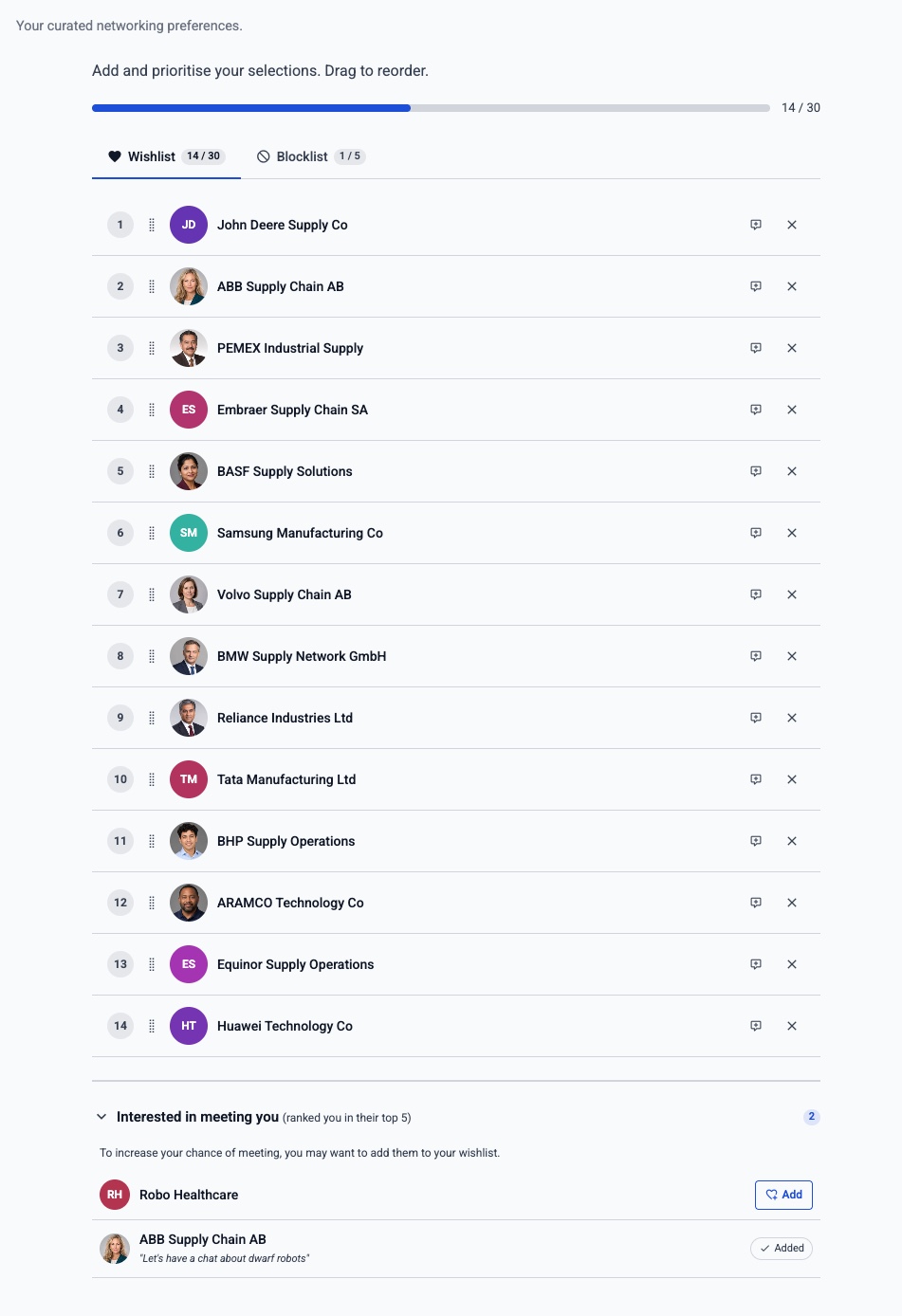
Participants submit ordered choices using the profile detail and questions the organiser makes available.
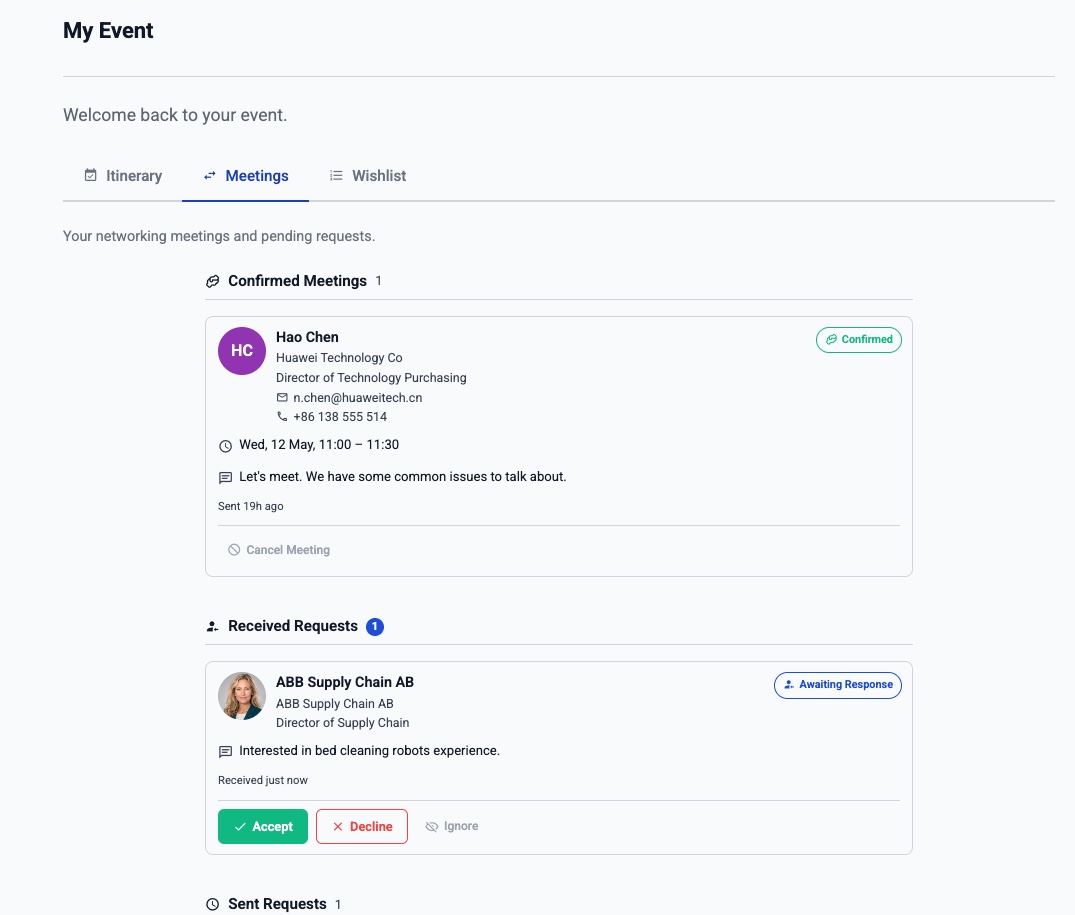
Confirmed meetings, requests, purpose, time, place, and partner detail stay together in the personal portal.
Networking Test Mode
Rehearse the real networking journey before registrants see it
Configure networking before launch, then use trusted organiser imitation to experience the registrant Portal as selected participants. Create and receive meeting requests, confirm or decline them, build wishlists, schedule meetings, and exercise the relevant Open and Curated Networking workflows without exposing networking to real registrants.
Configure before launch
Set up groups, relationships, privacy, forms, wishlists, places, scheduling rules, and the other networking choices your event needs.
Imitate real participants
Choose trusted test participants and step through the Portal as them, including sending, receiving, confirming, and declining requests without affecting real registrants.
Go Live with confidence
Upgrade to Engage when the rehearsal is complete. EventGen removes disposable Test interactions and keeps the networking configuration needed for launch.
Test communications are suppressed by default. Organisers can deliberately redirect controlled test delivery only to verified organiser test recipients. When you are ready, subscribe or upgrade to Engage and switch networking Live: disposable Test interactions are removed while the configuration needed for launch is retained.
Hosted buyer and meet-the-buyer events live or die by the quality of their meetings. EventGen is matchmaking software built for exactly that: capture buyer and supplier profiles, let participants build meeting wishlists, create and review proposed matches, then schedule and operate every appointment from a sophisticated organiser dashboard, without exporting to spreadsheets or forcing a generic registration tool into shape.
Everything a matchmaking programme needs
Curated matching with organiser control
Run ordered wishlists, mutual and one-sided matching, profile scoring, fill-gap matching, preliminary review, confirmation, scheduling, place allocation, and final release. The organiser keeps full manual control at every phase.
Optional AI Intent Matchmaking
Let participants search in natural language or define a Networking Objective, then use grounded Meeting Fit and AI Intent Match alongside existing wishlists, Profile Match, review and organiser control. Configure it independently for each direction.
Open networking too
Let attendees browse and search profiles, request or direct-book meetings, accept or decline, suggest another time, reschedule when allowed, and manage their own availability.
Granular profile privacy
Choose exactly which fields the other side can search and see in list, profile, request, confirmed-meeting, and itinerary contexts. Each networking direction can reveal different information as trust develops.
Meeting wishlists and custom forms
Collect a simple optional or mandatory reason, or build a custom form for each relationship with questions about topics, products, budget, meeting priority, or any other useful context.
Better preference and review tools
Let participants rank choices, see who wishlisted them, block unsuitable matches, and request limited removals during preliminary review. Organisers approve or reject each request and can assess replacements alongside it.
Custom feedback and no-show reporting
Collect a consistent star rating plus an organiser-defined post-meeting form. Independently decide which side may report whether the other attended, and whether feedback is visible to the other party.
Team networking that understands people
Team members contribute to one composite wishlist. EventGen uses contributor attribution as an assignment preference; leaders can prioritise the shared list, assign or move meetings between members, and manage concurrent capacity.
Invite additional attendees
Allow selected registration types to invite eligible guests to confirmed meetings, per direction. Set auto-accept rules and guest limits; conflicts are checked and invitations are adjusted automatically after rescheduling.
Flexible physical and virtual places
Use dedicated stands or tables, auto-allocated pools of shared tables, unlimited-capacity public areas, or virtual rooms. EventGen can generate a secure room link and provide a waiting room, timer, and next-meeting redirect.
Scheduling and What-If resolution
Automatic scheduling respects attendance days, sessions, blocked times, meeting limits, team availability, concurrency, and place capacity. What-If explains a clash and proposes single- or multi-meeting moves before you commit.
Live meeting-risk operations
On the event day, venue check-ins feed live presence markers and a Meetings at Risk view. Staff can spot who has not arrived, contact them, then cancel, reschedule, or replace meetings manually or by re-matching affected participants.
Meeting lifecycle communications
Use one-click email responses, meeting reminders, and configured notifications for invitations, confirmations, declines, cancellations, reschedules, guest changes, and schedule updates.
Onsite meeting verification
EventGen Onsite lets staff scan a participant, view imminent meetings, and record that both attended or which side was a no-show. A shared notes thread connects staff on the venue floor with the dashboard or help desk.
Meeting-led mobile companion
In the Lead Retrieval app, hosted buyers and exhibitors see Happening Now and Up Next, a live countdown, counterpart details, purpose, place, and a full timeline. They can leave private notes, rate meetings, and mark attendance, even offline.
Meeting downloads and reports
When enabled per side, registrants download their confirmed meetings with times, places, purpose, visibility-approved partner fields, their own feedback, and their own attendance report. Organisers can export meeting and wishlist data.
Networking analytics
Track meeting status and scheduling, daily or weekly activity, average and median request-response time with response-speed bands, networking directions, most-requested people, active-wishlist fulfilment, cancellations and declines, slot and place utilisation, fairness by registration type and meeting distribution, feedback submission, reported no-shows, and organiser-recorded occurrence.
Hosted buyer FAQ
What is hosted buyer software?
Hosted buyer software, sometimes called a hosted buyer platform, runs curated B2B programmes where qualified buyers are matched and scheduled into relevant meetings with suppliers. EventGen handles applications and profiles, meeting wishlists, matchmaking, organiser review, scheduling, event-day operations, and reporting in one platform.
Can EventGen run a meet-the-buyer event?
Yes. Meet-the-buyer events use the same core workflow as a hosted buyer or buyer–supplier programme: qualify participants, collect profiles and meeting wishlists, create and review relevant matches, then publish conflict-aware one-to-one appointment schedules.
What is a hosted buyer meeting wishlist?
A meeting wishlist, also written wish list, is the ranked list of people or organisations a participant wants to meet. EventGen can combine buyer and supplier preferences with profile criteria, limits, blocks, and organiser priorities before proposed meetings are created.
Can AI Intent Matchmaking supplement hosted buyer wishlists?
Yes. It is an optional additional layer. Participants can define networking objectives or search in natural language, and organisers can use AI Intent Match alongside the existing wishlist, Profile Match, review and scheduling tools. It does not replace the hosted buyer workflow.
How does EventGen avoid matching suppliers with direct competitors?
EventGen starts with organiser-defined buyer–supplier relationships rather than treating similar profiles as automatically compatible. Suppliers do not need to be eligible to meet other suppliers. Cross-field rules can compare buyer needs with supplier offerings, mandatory criteria can exclude unsuitable pairs, and wishlists, blocks, review, and organiser controls protect the final meeting programme.
Can EventGen schedule one-to-one hosted buyer appointments?
Yes. EventGen turns approved matches into conflict-aware one-to-one meeting schedules. These are also commonly described as 1-to-1 or 1-2-1 appointments. Scheduling respects attendance days, sessions, availability, teams, meeting limits, and place capacity.
Does EventGen support both hosted buyer and open networking?
Yes. Curated hosted buyer programmes and open networking run on the same platform, so you can offer structured matchmaking and attendee-led meeting requests at the same event.
How does EventGen protect attendee privacy during networking?
For every relationship direction, organisers control field visibility separately for search, browse lists, full profiles, requests, confirmed meetings, and itineraries. That means contact or profile details can be revealed gradually instead of exposing everything before a meeting is agreed.
How does scheduling handle conflicts?
Automatic scheduling checks attendee and team availability, sessions, blocked times, attendance days, meeting limits, concurrency, and place capacity. The What-If tool explains conflicts and proposes changes before the organiser applies them.
What can organisers monitor on the event day?
Venue scans feed live presence markers and a Meetings at Risk view. Organisers can identify a participant who has not arrived, contact them, and then reschedule, cancel, or replace affected meetings. Onsite staff can also verify meetings and share notes with the back office.
Can we test hosted buyer networking before launch?
Yes. Networking Test Mode lets organisers configure the experience and use trusted organiser imitation to rehearse the registrant Portal with selected participants. Real registrants cannot see or use networking, and Test communications are suppressed by default unless deliberately redirected to verified organiser test recipients. Upgrade to Engage when you are ready to Go Live; disposable Test interactions are then removed while configuration is retained.
Is hosted buyer networking available on the free plan?
Free and paid Base plans include bounded Networking Test Mode for organiser-only rehearsal. Production networking for real registrants requires Engage; a non-Engage organiser is prompted to upgrade at Go Live. Enterprise+ includes networking.
Related networking tools
Choose the meeting model that fits your event
Networking Test Mode
Rehearse the real Portal and organiser workflows safely before networking goes Live.
Learn more →AI Intent Matchmaking
Add natural-language discovery and objective-led curation to an existing networking direction.
Learn more →Curated networking
Curate and schedule meetings for sponsors, investors, delegations, partners, or other B2B formats beyond the hosted buyer model.
Learn more →Networking software
Let attendees browse, request, book, and reschedule meetings themselves from the branded portal.
Learn more →Lead Retrieval app
Give exhibitors lead scanning and give hosted buyers a personal event-day meetings companion.
Learn more →What is a hosted buyer programme?
Read the practical guide to qualification, meeting wishlists, scheduling, operations, and reporting.
Learn more →How hosted buyer matchmaking works
Follow the complete workflow from applications and preferences to reviewed schedules and measured meetings.
Learn more →Why similarity matching fails
See why shared keywords can identify a direct competitor rather than a useful buyer–supplier meeting.
Learn more →How to rehearse networking
Use a practical checklist to test participant perspectives, communications, and launch readiness.
Learn more → Start your event now.
Keep building together.
Use your event website or describe what you have in mind. Review an editable first version before signing up, then finish the details in your dashboard.
Free includes up to one event place per calendar year, 50 registrants per event, core event tools, and Networking Test Mode. No credit card required.
When you sign up to keep your event, you agree to our Terms of Service and Privacy Policy.