Venue IN and OUT scanning
Use smart direction, duplicate protection, and day-eligibility checks for the main entrance or controlled event zones.
Event check-in app
Give event staff venue and session check-in, badge printing, self-service kiosk, walk-in handling, and meeting verification on phones or tablets, with offline capture that synchronises when connectivity returns.
Start with a free account. No credit card required.
The problem
Check-in is where a smooth event can suddenly become a queue. Staff need to recognise the right ticket, stop duplicates, handle people arriving on the wrong day, print a badge, admit legitimate walk-ins, and keep moving even when the network is overloaded.
EventGen Onsite is an offline-first companion for event-day teams. It uses the same attendee and programme data as the dashboard, supports phone cameras or compatible hardware scanners, and sends attendance back to the event record when connectivity is available.
How it works
Open venue check-in, a specific session roster, badge printing, kiosk mode, or meeting verification.
Use the device camera, compatible hardware scanner, QR or barcode, or an allowed attendee lookup fallback.
Check day eligibility, direction, duplicate status, session roster, and permitted walk-in overrides.
Store scans locally while offline and synchronise attendance and operational notes when the connection returns.
See it in action
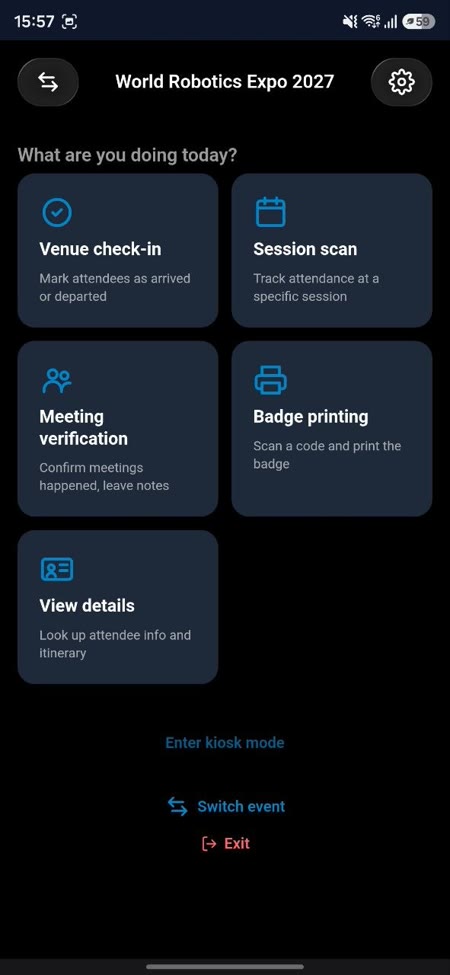
Staff select the task they are performing instead of navigating the full organiser dashboard.
Kiosk mode lets attendees check themselves in, with a controlled lookup fallback when needed.
Capabilities
Use smart direction, duplicate protection, and day-eligibility checks for the main entrance or controlled event zones.
Scan against a session roster with clear eligibility results and a one-tap walk-in override for authorised staff.
Resolve the same badge template used by the dashboard and print on check-in, including when the venue connection is unavailable.
Let attendees scan themselves in at an unattended device, with last-name lookup as a fallback and a protected staff exit.
Use the device camera or compatible USB/Bluetooth hardware scanners based on the pace and setup of each entrance.
Give hired door teams locked scan-only or onsite-only access rather than exposing the full dashboard.
Check imminent networking meetings, record attendance or no-shows, and leave notes for the back-office operations team.
Queue scans and print activity on the device, then reconcile with the live event when a reliable connection returns.
When to use it
Move delegates through the door, print badges, and keep live attendance connected to the organiser dashboard.
Enforce session rosters, record attendance, and allow controlled walk-ins where the team decides.
Check day eligibility, support multiple entry points, and understand who is currently present.
Use venue presence and meeting verification to identify appointments at risk and capture actual occurrence.
One connected platform
Eligibility, attendee type, event days, custom fields, and status come from the live registration record.
Use one template for pre-event bulk PDF output and event-day printing from the Onsite app.
Session rosters, capacity, and personal selections drive session scanning results.
Keep staff check-in separate from exhibitor lead scanning while both resolve the same approved attendee identities.
Yes. EventGen Onsite is offline-first. Scans and badge activity queue on the device and synchronise when connectivity returns.
Yes. Session scanning checks the roster and supports an authorised one-tap walk-in override.
Yes. The Onsite app uses the same badge template as the dashboard and supports on-demand and automatic printing, including offline operation.
Yes. Self-service kiosk mode supports badge scanning and a controlled last-name lookup fallback.
No. Organisers can use locked scan-only or onsite-only accounts for hired or temporary event staff.
Explore related capabilities
Build the attendee journeys and eligibility rules that feed the event-day roster.
Learn moreGive exhibitors a separate offline badge-scanning workflow for sales qualification.
Learn moreConnect check-in to registration, programme, speakers, communications, and the attendee portal.
Learn moreUse your event website or describe what you have in mind. Review an editable first version before signing up, then finish the details in your dashboard.
Free includes up to one event place per calendar year, 50 registrants per event, core event tools, and Networking Test Mode. No credit card required.
When you sign up to keep your event, you agree to our Terms of Service and Privacy Policy.