Email, SMS, WhatsApp, and push
Coordinate four channels from one logical event template while keeping channel-specific activation and delivery rules.
Event communications software
Create personalised communications, triggers, and campaigns using live event audiences. Draft with a tag-aware AI writer, connect your providers, control channel windows, track delivery, and stop reminders when the required action is complete.
Start with a free account. No credit card required.
The problem
Static mailing lists become wrong the moment someone registers, pays, changes type, confirms a meeting, completes a form, or fulfils an exhibitor task. Rebuilding spreadsheets before every send wastes time and risks messaging the wrong person.
EventGen uses saved event audiences that can be evaluated against current registration, payment, programme, networking, and obligation data. One logical template can coordinate several channels while each channel retains its own active dates and provider requirements.
How it works
Use the visual editor or tag-aware AI writer to insert valid event data. Generated and rewritten audience communications follow the event's saved brand voice.
Configure email, SMS, WhatsApp, or push with the appropriate connected provider and active window.
Use registration types or saved filters that evaluate against current event data rather than a stale export.
Run campaigns or lifecycle triggers with rate controls, pause/resume, delivery parsing, and current-state eligibility.
See it in action
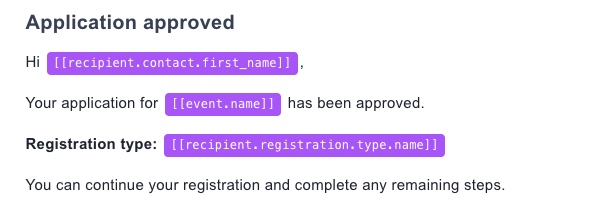
Build attendee communications where the registration, meeting, payment, and event tags already exist.
Capabilities
Coordinate four channels from one logical event template while keeping channel-specific activation and delivery rules.
Create branded email content with a WYSIWYG editor and dynamic tags instead of assembling HTML externally.
Draft or rewrite audience communications in the editor, automatically insert valid EventGen placeholders, and follow that event's saved brand voice. Define the voice manually, extract it from one or more communication templates, or extract it from pasted text.
Target current event records using reusable filters rather than exporting and rebuilding lists for each send.
Automate relevant confirmations, receipts, networking events, and other configured moments in the attendee journey.
After preview and activation, recheck eligibility at delivery so fulfilled or awaiting-review participants are excluded and newly eligible people can enter.
Stop or start a channel on a defined date, such as ending early-bird messaging automatically.
Connect supported providers and parse their event feedback so delivery activity is visible alongside the event.
When to use it
Send confirmations, approvals, payment receipts, incomplete-journey prompts, and event instructions.
Notify participants about requests, confirmations, declines, reschedules, reminders, guests, and schedule release.
Announce obligations and remind only the exhibitors who still need to complete each task.
Use the appropriate configured channels for important operational information and attendee changes.
One connected platform
Target current attendee type, progress, fields, products, payments, and approval state.
Communicate meeting requests, lifecycle changes, schedule release, reminders, and rescheduling.
Keep announcements and reminders aligned with the people who remain outstanding.
Use order, product, and payment status in the commercial attendee journey.
EventGen supports email, SMS, WhatsApp, and push communications from the event platform.
Yes. Saved audiences can be evaluated against current event data, and configured obligation campaigns recheck eligibility at delivery after preview and activation.
The tag-aware AI writer can draft or rewrite audience communications directly in the editor, insert valid contact, event, registration, field, organiser, meeting, system, and content-block tags, and follow the event's saved brand voice. Organisers can define that event-specific voice manually, extract it from one or more communication templates, or extract it from pasted text.
Supported bring-your-own-provider options include SendGrid, Amazon SES, Twilio, WhatsApp Business, and Firebase-related delivery paths as applicable to the channel.
Campaign operations support controls such as pause/resume and rate limiting, with provider-specific delivery event parsing.
Explore related capabilities
Use live registration journeys and attendee data as communication context.
Learn moreAutomate task announcements and reminders around current fulfilment.
Learn moreCoordinate requests, confirmations, schedule changes, and meeting reminders.
Learn moreKeep EventGen communication funnels distinct from external organiser campaigns and Google Ads journeys.
Learn moreUse your event website or describe what you have in mind. Review an editable first version before signing up, then finish the details in your dashboard.
Free includes up to one event place per calendar year, 50 registrants per event, core event tools, and Networking Test Mode. No credit card required.
When you sign up to keep your event, you agree to our Terms of Service and Privacy Policy.