One platform. Every feature your event needs.
Registration, programme, networking, obligations, floor plans, sales CRM, automated application review for application-led events, communications, payments, a branded portal, on-site apps, and AI analytics, configured by AI and managed from one dashboard.
AI Guided Setup
A guided path through the whole event setup.
Start an editable first event and portal from a description, recipe or website before signup. Then use one guided checklist and AI Assistant across the setup areas your event needs, from registration and programme to networking, commercial setup, operations and launch review.
- Use a public website, a description or a recipe to begin
- Add context without restarting or losing earlier answers
- Review imported facts, styling, programme and speakers where available
- Create an editable first event and attendee portal before signup
- Choose relevant areas across registration, portal, networking and operations
- Track live progress, defer unknowns and return to unfinished work
- Confirm proposed changes before they affect your event
AI Assistant
AI builds your event - 300+ confirmed actions.
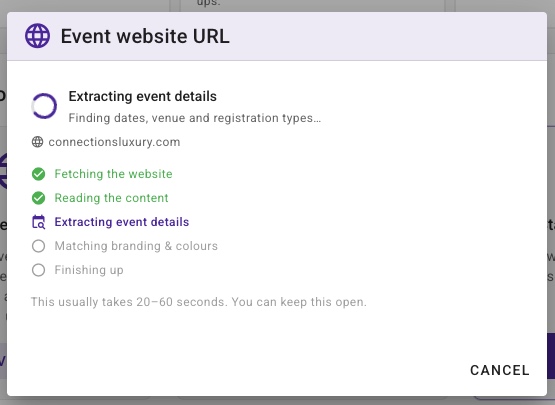
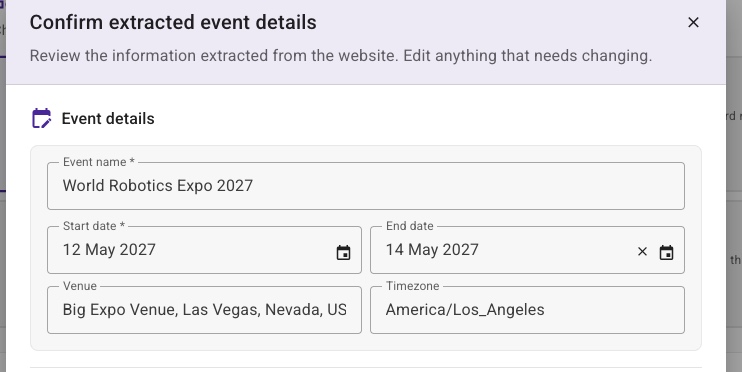
Describe what you need, paste your event website URL, or upload images, documents, or spreadsheets. The multimodal AI uses that context to draft your setup - registration types, fields, portal pages, and communications. Every action is confirmed before execution and available on every dashboard page, context-aware to what you're working on.
- Multimodal input from images, documents, and spreadsheets
- Dictate up to 60 seconds, review the text, then send
- Extract event details from any website URL or description
- Create registration types, fields, flows, and pages
- Build and publish portal wireframes with widgets
- 40 networking tools - groups, relationships, slots, places, matching
- Draft multi-channel communication templates
- Golden templates for conferences, exhibitions, galas, workshops, weddings
AI Filter Builder
Ask for exactly who you need - in plain English.
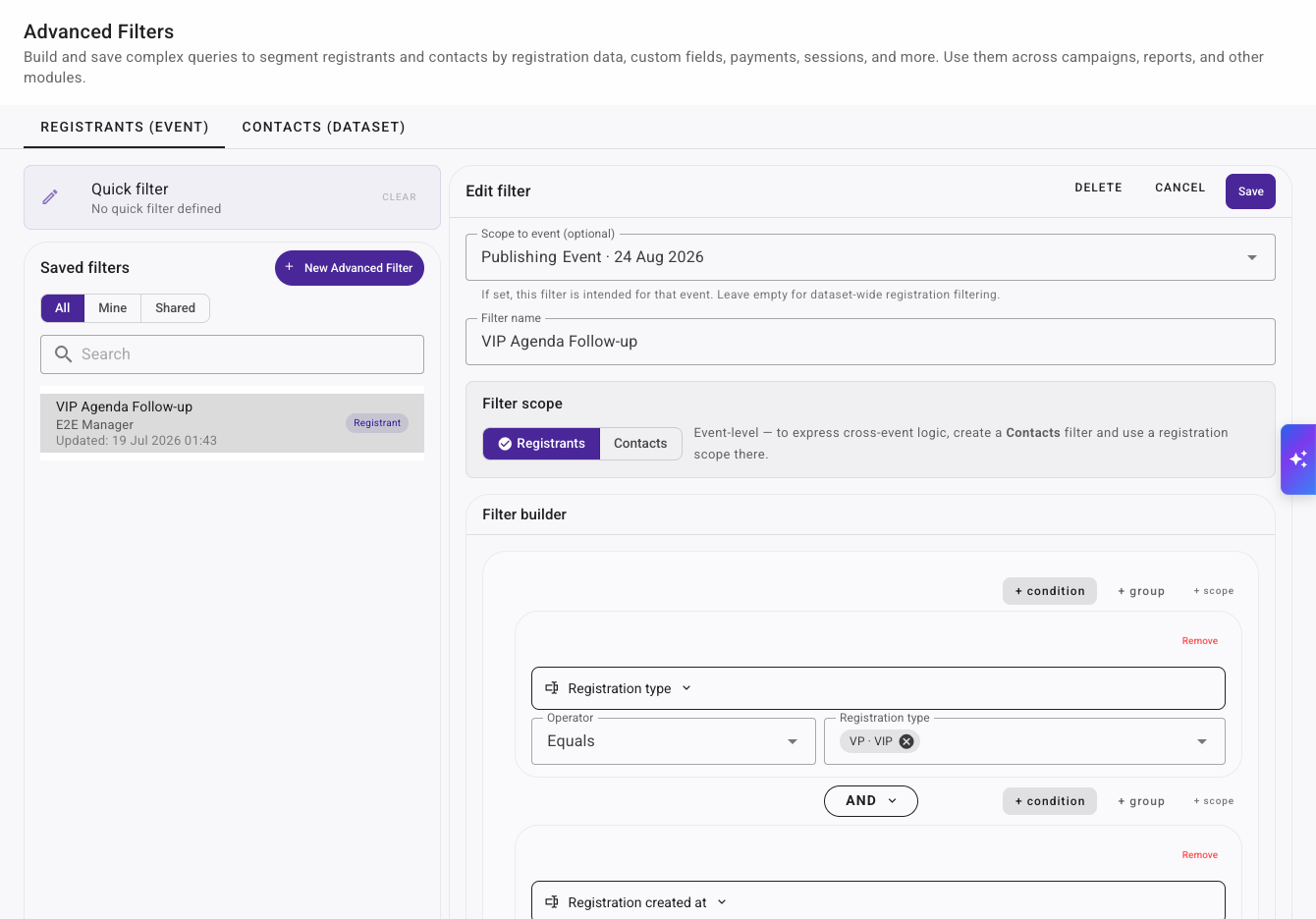
Describe the audience or records you need and EventGen turns the request into a transparent, editable filter. Combine dates, registration data, progress status, custom fields, products, payments and session selections without manually assembling every rule.
- Understands AND, OR, exclusions, dates, comparisons and grouped conditions
- Resolves event-specific registration types, sessions and other records
- Flags criteria unavailable in the current filter metadata instead of inventing rules
- Shows the generated rules for review before saving
- Keeps saved filters dynamic as registration data changes
- Reuse audiences across registrants, campaigns, reports and exports
- Example shown: VIPs registered since 1 July, completed, and missing a session
Registration
Multi-path registration with team booking.
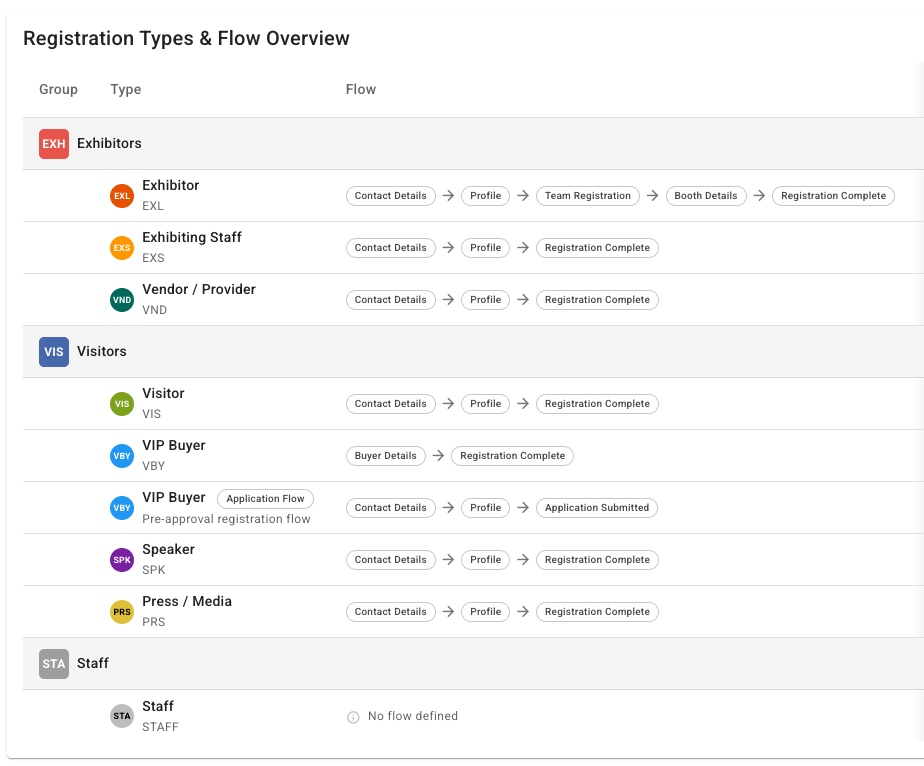
Different attendee types get different journeys, forms, and pricing - all in one event. Team leaders register their whole delegation. RSVP mode provides one-click accept/decline for invitation-only events. Registrants pick up exactly where they left off.
- Per-type registration flows with conditional logic and field overrides
- Team registration - leader books and pays for the group
- RSVP mode with one-click email actions (no login required)
- Approval and email verification workflows per type
- Scheduled registration windows (open/close dates)
- Dataset-level contact reuse across events - no re-asking
Payments & Ticketing
Tickets, products, and promo codes - just ask.
Sell tickets, workshops, and add-ons with VAT, capacity, and per-type pricing. Take direct Stripe payments or issue invoices with fixed due dates and optional automatic follow-up. EventGen takes no commission, holds none of your ticket revenue, and adds no percentage fee.
- Products and tickets with VAT, capacity, and per-registration-type pricing
- Promo & discount codes - percentage or fixed, scoped to specific products
- Time-windowed and usage-limited codes (early-bird, flash sales)
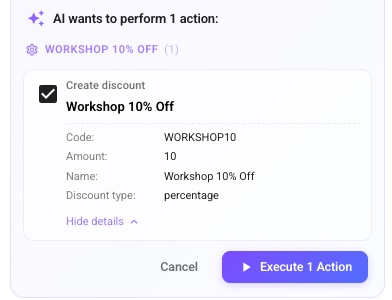
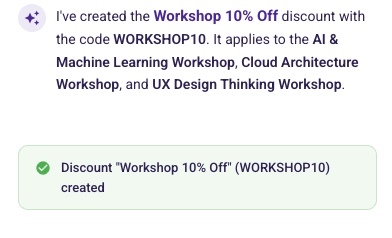
- AI creates a discount from a plain request - code, amount, and scope
- Bring your own payment provider; orders, payments, and refunds tracked
- Invoice payment terms, captured due dates, and configurable reminders for invoices that remain unpaid
- 0% EventGen commission - Stripe processing fees still apply
Floor Plans & Stands
Describe the floor plan. AI builds the first draft.
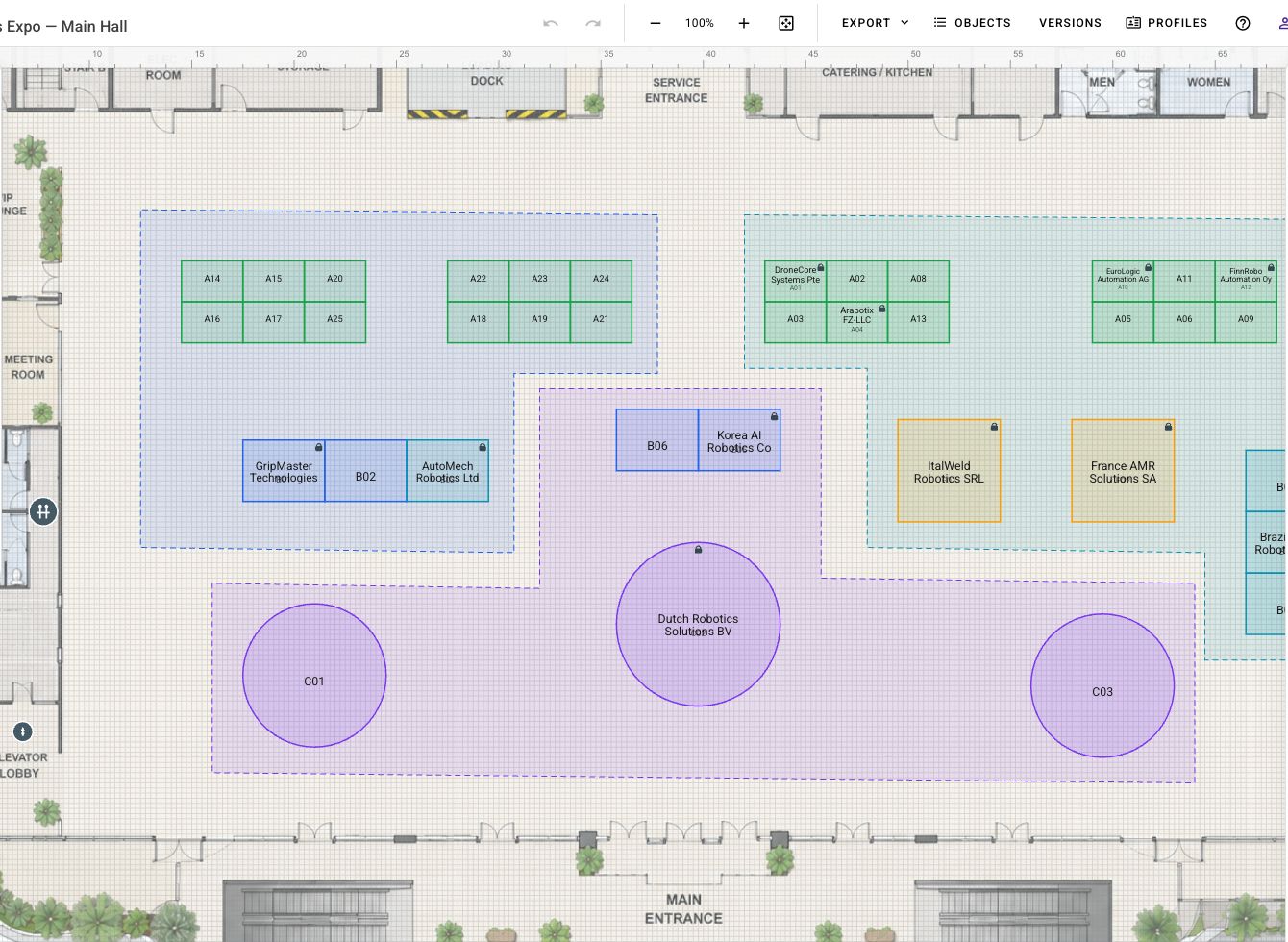
Tell AI the hall size, stand dimensions, rows, gaps, and feature areas, or upload a labelled stand-plan image. Each confirmed layout becomes an editable, undoable change in the browser designer. Refine it, attach pricing tiers, generate sellable products, and publish the interactive attendee map when you are ready.
- AI builds measured layouts from a brief - canvas size, object count, dimensions, rows, columns, clear gaps, and feature areas
- Upload a labelled plan image - AI maps readable stand or table positions and rotations; add scale for metre accuracy
- Review, edit, undo, redo, and save every confirmed AI layout before publishing
- Full design toolkit - draw, resize, rotate, align, distribute, snap, metre-true dimensions
- Four plan types: exhibition stands, gala table plans, theatre seating, and annotation
- Pricing tiers by zone - premium corner stands priced differently, automatically
- Generate products from stands - sold through the same checkout as your tickets
- Seat-row generator builds theatre and cinema-style seating in seconds
- Interactive attendee map on the portal with company and stand-number search
- Live inventory - every stand tracks from available to reserved to sold
Event CRM
Permanent deals in an event CRM connected to the real event work.
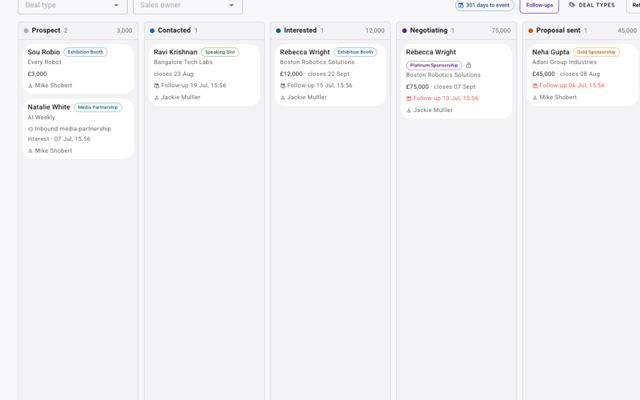
Sell stands, sponsorships, and hosted-buyer places from an event-native CRM. A deal can begin before anyone registers and remains the same commercial record after registrations are linked or the deal is won. It connects sales to onboarding, explicitly attributed orders, payments and stands, campaigns, and event engagement, while your team works a kanban and follow-up dashboard from first contact to close.
- Permanent event-scoped deals own their type, stage, owner, value, close date, notes, privacy, activities, and follow-ups
- Link several registrations to one deal, or relate one registration to several independent deals, with one primary onboarding context
- Registration types control participant journeys; deal types categorise commercial opportunities
- Contacts, companies, relationship history, and engagement carry across editions; each edition gets a fresh deal with its own deadline and fulfilment
- Explicitly attributed stands and paid orders can update the correct deal without guessing from an attendee or company
- Mark a deal won, link an existing registration, or win and create one; the commercial record remains intact
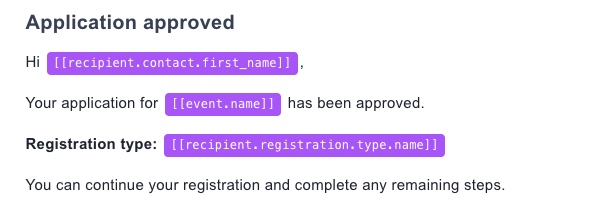
- Winning can auto-send a configured welcome campaign and issue a personal registration magic link
- Log calls, WhatsApp, LinkedIn, and in-person touches; push stage changes to your company CRM, Salesforce, HubSpot, or Zapier
Automated Application Review
Applications reviewed automatically, not just collected.
For events with an application-led registration route, EventGen evaluates each submitted application automatically using the decision logic and scoring you configure, AI for qualitative answers, or both. The result can automatically approve or decline the application and move the registrant into the correct status.
- Trigger assessment automatically when the registrant submits their application
- Apply your event-specific eligibility logic and scoring criteria consistently
- Use AI to evaluate qualitative answers that fixed rules cannot judge well
- Combine logic, scores, and AI into one automated decision process
- Automatically approve or decline when the configured outcome is reached
- Move the registrant into the resulting approval status without manual triage
Exhibitor Manual
Every exhibitor show-ready - without the email chase.
Give every exhibiting company one deadline-driven checklist, the Exhibitor Zone on their portal, where they complete the obligations needed to get show-ready. Reuse forms, documents, orders, payments, and stand requirements; target each task to the stands it applies to; watch a live completion matrix; and activate Campaign reminders that stay aligned with whoever is still outstanding.
- One Exhibitor Zone per company - a deadline-driven checklist of everything needed to exhibit
- Build the checklist from obligations: compliance documents, forms, payments, orders, stand information, and inline content
- Target tasks to the right stands - by registration type, booth type, size, or power/water/rigging needs
- Live completion matrix - every exhibitor against every task, with per-company progress and not-applicable handled
- After preview and activation, Campaign reminders recheck the current outstanding audience at delivery
- The AI assistant can build the manual, add tasks, and tell you who is still outstanding
Networking & Matchmaking
Open and curated networking in one engine.
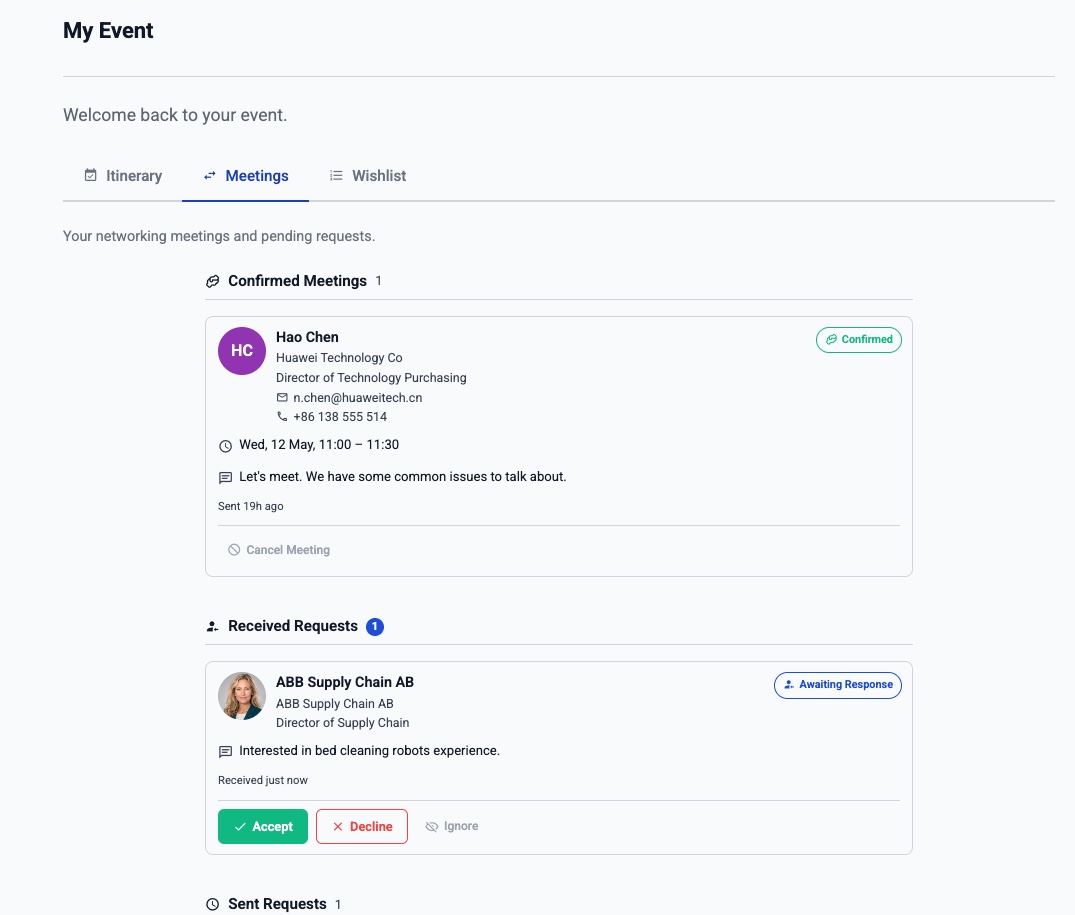
Use Curated Networking for organiser-led B2B matchmaking and Open Networking for attendee-led discovery and booking. Before launch, Networking Test Mode lets trusted organisers imitate selected registrants and rehearse the real Portal journey without exposing networking to attendees. EventGen separates similarity from compatibility: directional relationships define who may meet, while cross-field rules compare one side’s needs with the other side’s capabilities.
- Networking Test Mode - configure first, then safely rehearse requests, responses, wishlists, matching, and scheduling through organiser imitation
- Curated: wishlists → freeze → match → review → schedule → release
- Open: browse, request, direct-book, counter-propose, reschedule
- Five matching strategies: mutual, one-sided, Profile Match, AI Intent Match, Top Up
- Role-aware eligibility and complementary need-to-offering matching
- Mandatory compatibility rules can exclude unsuitable pairs
- Team networking - booth concurrency, member assignment, leader swap
- Composite team wishlists with contributor-aware assignment
- Field visibility by search, list, profile, request, confirmed, and itinerary phase
- Custom request, wishlist, and post-meeting feedback forms
- Directional guest invitations, attendance and no-show reporting
- What-If scheduling explains conflicts and suggests ranked fixes
- Dedicated stands, pool tables, public spaces, and virtual rooms
- Live presence, meetings-at-risk, onsite verification, and back-office notes
- Meeting status, response-time, fulfilment, utilisation, fairness, feedback, no-show, and occurrence reporting
Optional AI Networking
AI Intent Matchmaking, when natural-language discovery adds value.
Add participant intent search, objective-led recommendations and organiser curation to the existing networking engine. Search meaning across visible freehand profile information and organiser-selected, security-scanned files or images, while exact filters, wishlists, Profile Match, eligibility, privacy and scheduling remain in control.
- Optional per direction: Search by intent, objective-led matching, or both
- Networking Playbooks based on participant-defined meeting objectives
- Meeting Fit and grounded Conversation Briefs using authorised evidence
- Editable meeting-purpose drafts that participants review before sending
- AI Intent Match as an additional manual or automatic curation strategy
- Job-fair CV and buyer-supplier catalogue search examples
- Ordinary deterministic networking remains available when AI is off or unavailable
Obligations Management
Automate every obligation from request to assessment.
Manage anything an attendee, exhibitor, speaker, sponsor, or supplier needs to complete from end to end. EventGen requests the form, document, payment, wishlist, or other task; sends Campaign-backed reminders; tracks progress and submission; and can assess uploaded documents against your policy. When invoice reminders are enabled, each new invoice becomes its own due-date-driven payment obligation.
- Define obligations around forms, documents, payments, orders, wishlists, and other event actions
- Apply each obligation to the right audience and choose its enforcement level
- Link published Campaign templates to the initial announcement and scheduled reminder roles
- After preview and activation, eligibility is rechecked at delivery, with no lists to rebuild by hand
- Automatically follow up each newly issued unpaid invoice from its captured due date, then stop when it is paid, cancelled, or reaches your reminder limit
- Monitor requested, outstanding, submitted, accepted, and rejected work from one view
- For uploaded documents, choose assessment-only, auto-approve, auto-reject, or both
Attendee Messaging
Let attendees message each other - no formal programme required.
Not every event wants a structured networking programme. Attendee Messaging is the lighter-touch alternative: attendees start a private one-to-one conversation and the other person is notified in the portal and by email. You still decide who can talk to whom - it runs on the same permission model as networking - with built-in anti-spam so nobody gets flooded.
- A lighter alternative to structured meetings - attendees simply message each other
- You decide who can message whom: directional rules by group or ticket type (buyers → suppliers, not the reverse)
- Two independent switches - on the registrant list, and per networking direction
- Anti-spam by design: a capped number of opening messages, and no follow-up until they reply
- Recipients get an in-portal notification and an email, respecting their networking opt-outs
- Private one-to-one threads, kept inside your event portal
- Turn it on by itself, or alongside a full networking programme
Portal
A branded event website, not just a form.
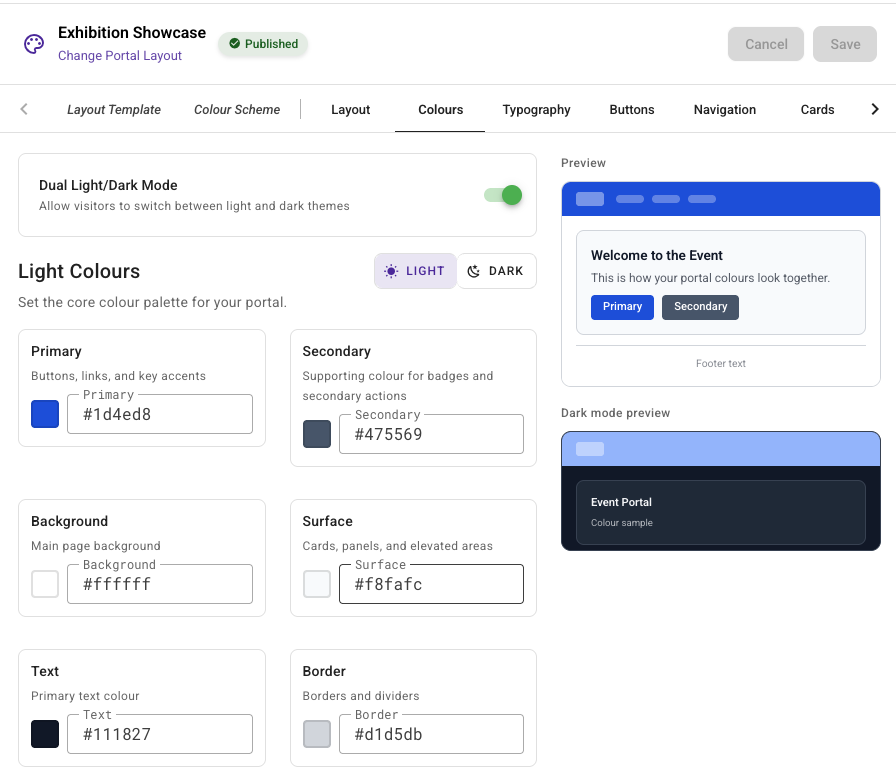
Build a fully branded attendee portal with a visual wireframe builder. Five layout templates, per-widget visibility by registration type, and pre-rendered pages for fast global delivery. Custom domains with automatic SSL - one domain, multiple events by path.
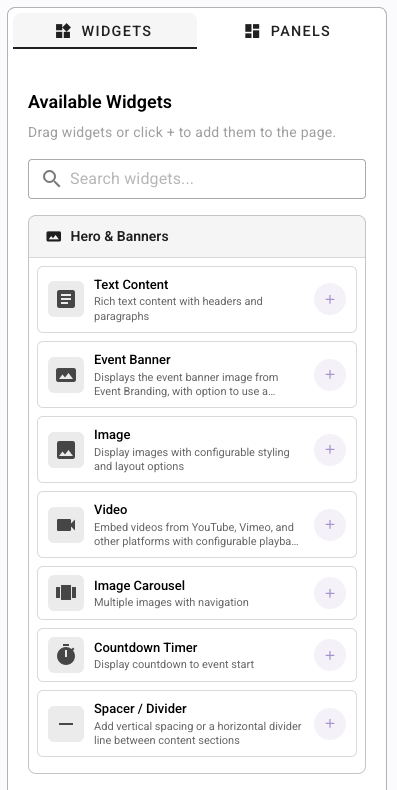
- Visual wireframe builder with panels, zones, and widget placements
- Five layouts: Conference Hub, Exhibition Showcase, Wedding Elegance, and more
- Draft/publish workflow - wireframe, navigation, styling, and each page independently
- Custom domain with automatic SSL and multi-event paths
- Portal auth: email/password, magic link, Google, Microsoft OAuth
- Admin impersonation for testing and support
Portal Assistant
Instant answers for your attendees - in your words.
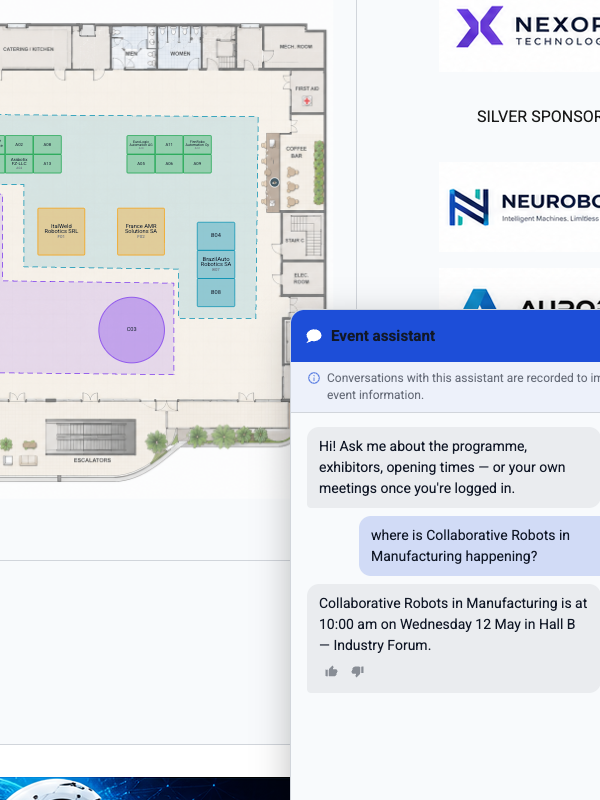
Add a self-serve assistant to your portal that answers attendee questions the moment they ask - session times, speakers, exhibitors, opening hours, and anything you write as a knowledge topic. Answers come straight from your event data and the topics you curate, shown exactly as you wrote them, so it never invents an answer. Logged-in attendees can ask about their own meetings and agenda too.
- On-brand chat widget embedded in your attendee portal
- Answers from your live event data - sessions, speakers, exhibitors, opening hours
- Curate your own knowledge topics; answers appear exactly as you wrote them
- Personal answers after login - an attendee's own meetings and agenda
- Unmatched questions are logged so you can fill the gaps
- Thumbs-up/down feedback and a match-rate dashboard
- Instant, and included on every plan - nothing extra to run
Communications
Four channels. One template. Dynamic audiences.
Email, SMS, WhatsApp, and push notifications from one logical template, with per-channel active date windows and registration-type targeting. A tag-aware AI writer drafts or rewrites personalised content directly in the editor, inserts valid EventGen tags automatically, and follows the event's saved brand voice. Campaigns support pause/resume, rate limiting, automated triggers, and audiences re-evaluated at send time.
- Visual WYSIWYG email editor with dynamic template tags
- Define an event-specific brand voice manually or extract it from one or more communication templates or pasted text; AI-generated and rewritten audience communications follow it
- Tag-aware AI writer inserts valid contact, event, registration, field, meeting, and system tags
- Automated triggers for confirmations, receipts, and networking lifecycle
- Campaign broadcasting with saved audiences (re-evaluated at send time)
- Once previewed and activated, obligation Campaigns recheck who still needs to act at delivery
- Per-channel active date windows - stop early-bird emails on Friday automatically
- BYO providers: SendGrid, Amazon SES, Twilio, WhatsApp Business, Firebase
- Delivery tracking with provider-specific event parsing
Programme
Session allocation meets networking intelligence.
Multi-track programme with capacity, waitlists, and selection rules. The allocation screen can seat people based on networking data - put sponsors next to buyers they wanted to meet. Virtual sessions with embedded rooms or your own Zoom/Teams link.
- Multi-track agenda with parallel and activity session groups
- Capacity with automatic waitlists and promotion triggers
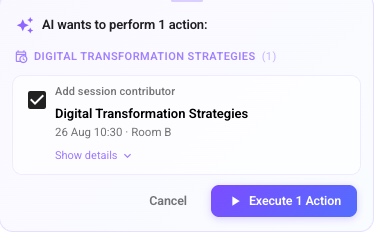
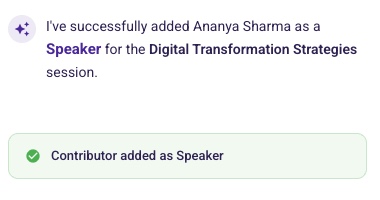
- Speaker, moderator, panellist, and chair contributor roles
- Session allocation using networking wishlists and meeting data
- Session access linked to product purchase (paid workshops)
- Virtual rooms with moderator early join and session page
On-Site
Event-day check-in, badges, and scanning - on any phone.
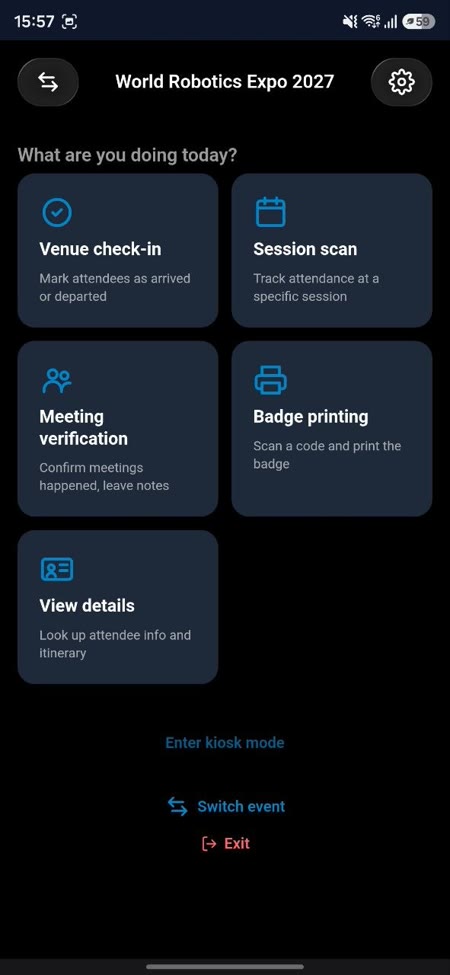
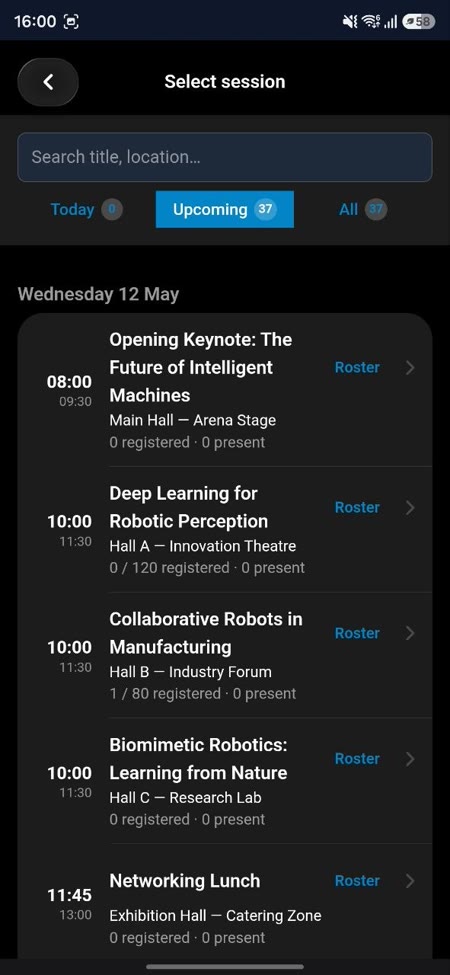
EventGen Onsite is the companion app for your event-day staff. Check attendees in at the venue or into sessions, print badges on the spot, and verify that networking meetings actually happened - with everything syncing live back to your dashboard. It works with the phone camera or a hardware laser scanner, and keeps working when the venue Wi-Fi does not.
- Venue check-in with smart IN/OUT direction, duplicate protection, and day-eligibility checks
- Session scanning with roster enforcement and a one-tap walk-in override
- On-device badge printing - auto-print on check-in, works fully offline
- Self-service kiosk mode: attendees scan themselves in, with last-name lookup as a fallback
- Meeting verification - confirm meetings happened and leave notes for the ops team
- Locked scan-only logins for hired door staff; onsite-only accounts for your crew
- Offline-first: scans queue on the device and sync the moment the connection returns
Badge Designer
Design any badge. Print it anywhere.
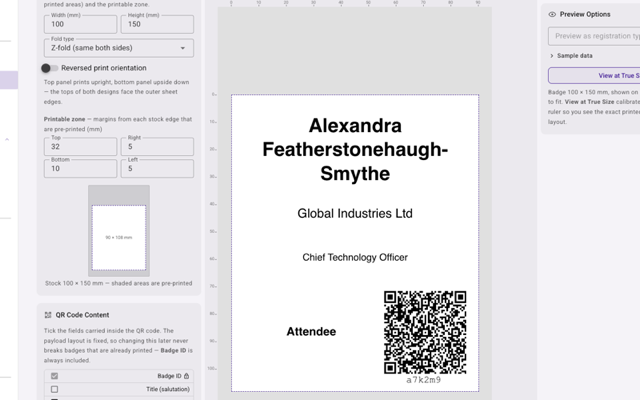
A visual badge designer with millimetre precision. Set any media size, drop in registrant fields, photos, QR codes, and barcodes, and see the badge laid out exactly as it prints. Export every badge - or just one registration type - as a print-ready 300-DPI PDF, or print on demand at the door from the Onsite app. One template, identical whether it comes off an office printer or a door-side kiosk.
- Any custom media size in millimetres, with pre-printed zones and fold support
- Drop in registrant fields, custom fields, text, photos, QR codes, and barcodes
- Live canvas that matches the printed result, down to 0.5 mm snapping
- Bulk export to a print-ready 300-DPI PDF - all registrants or filtered by type
- Print on demand at the door from the Onsite app - offline and kiosk-capable
- One template renders identically for office print and on-site printing
Lead Retrieval
One app, two modes: scan leads and run your meetings.
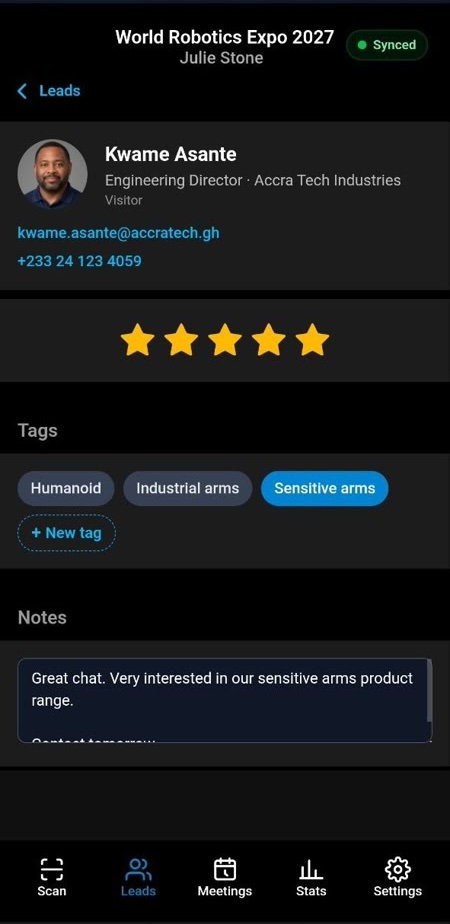
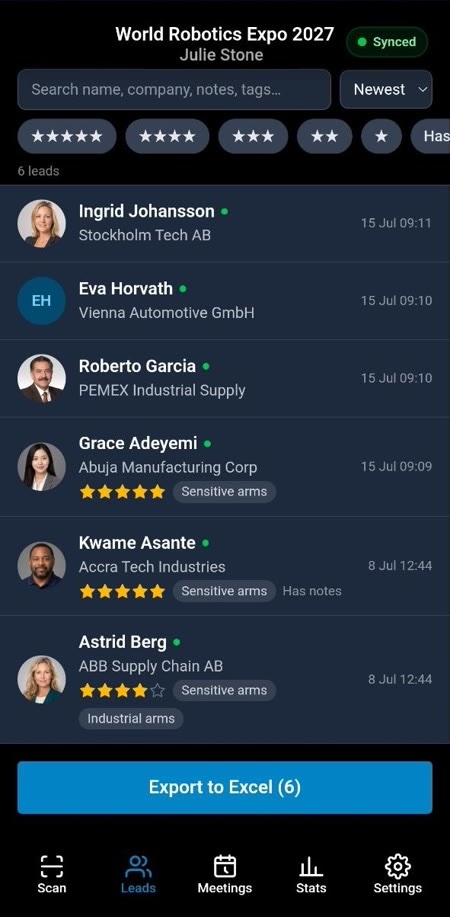
A phone app your exhibitors and hosted buyers run themselves - no app store, no shared hardware. In lead mode, scan an attendee badge and a quick-capture sheet slides up: star rating, tags, and a note, saved instantly. In meetings mode, the same app becomes a meeting companion - it shows who's up next with a live countdown, takes private notes, and marks no-shows, so nobody has to dig through the itinerary. Lead scanning is sold per event in fixed packs of activation slots, bought from your dashboard with the balance always visible - separate from your platform plan.
- Meetings mode: shows exhibitors and hosted buyers their next meeting with a live countdown, private notes, and no-show marking - no itinerary to hunt through
- Camera QR scanning with torch and zoom, hardware-scanner mode, and manual entry fallback
- One-tap qualification: 5-star rating, tag chips, and instant notes - no save button
- Team mode: one shared lead list per booth with per-scanner attribution and a leaderboard
- Excel export via the native share sheet - full contact details filled in on sync
- Works fully offline; leads queue on the device and sync when connectivity returns
- Simple activation codes: exhibitors enter a code or tap a link - one slot per device
- Every event includes 2 free activation slots, so you can test it before buying a pack
Campaign Attribution
Connect campaigns to completed registrations.
Follow consented campaign journeys from an organiser website, direct EventGen link, or bring-your-own-domain portal through to authoritative registration completion. EventGen keeps Google Ads, other organiser campaigns, and its own communication sends distinct, with privacy-suppressed first-party reporting and separately gated Google conversion delivery.
- UTM source, medium, campaign, term, and content attribution
- Consent-aware gclid, gbraid, and wbraid handling for eligible Google journeys
- External organiser-website hand-off without iframe registration
- Direct EventGen portal and verified BYO-domain journeys
- First-touch, last-touch, and last-non-direct EventGen reporting
- Included on every plan, with production-pilot-proven EventGen reporting in controlled rollout
Analytics & Insights
Every number that matters - summarised by AI.
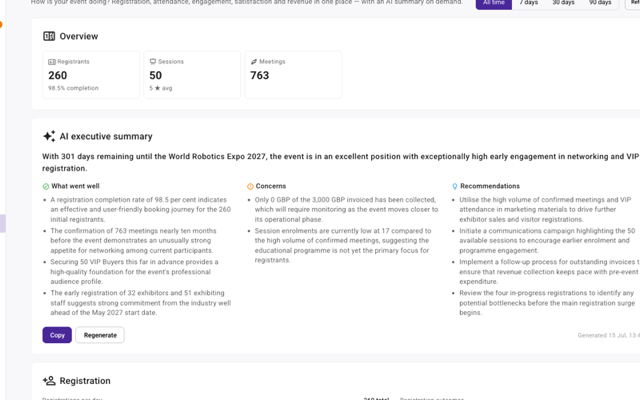
Registration, attendance, engagement, revenue, and satisfaction in one dashboard, with views from the whole event down to the last 7 days. Ask for an executive summary and the AI writes one that understands where you are in the event lifecycle - and runs sentiment analysis across your feedback.
- Registration, attendance, engagement, floor-space, activity, and revenue dashboards
- On-demand AI executive summary, aware of your event lifecycle stage
- AI sentiment analysis across survey responses and feedback
- Satisfaction and NPS from built-in post-event surveys
- Revenue tracking tied directly to orders and payments
- Time-range presets - whole event, 90, 30, or 7 days
Reports & Exports
Ready-made reports, exported the way you need them.
A fixed catalogue of reports covering every part of your event. Pick the columns you want, apply a saved audience filter, save the configuration to reuse next time, and export straight to a spreadsheet - with every download logged for the record.
- Reports on registrants, session enrolment, session feedback, meetings, orders, and venue check-ins
- Choose and reorder the columns you want on each report
- Apply saved audience filters to scope a report to exactly who you mean
- Save report configurations and reuse them across the event
- Export to Excel (.xlsx/.xls), CSV, or ODS, with a full download audit trail
Reminders & To-Dos
Nudges for attendees. A checklist for your team.
Reminders work on both sides of the event. Attendees get nudged before what matters, and your team gets a running list of what still needs doing before you go live. Reminder timing and recipient selection stay rule-based and predictable; optional AI review is configured separately for uploaded-document obligations.
- Automated attendee reminders before their meetings and sessions, with a configurable lead time
- Meeting reminders go to both people in the meeting
- Obligation follow-ups keep forms, documents, payments, wishlists, and other required actions on track
- An organiser setup to-do list flags what still needs doing before launch
- Snooze an item (for example 3 days or next week), dismiss it, or add your own to-dos
Roles & Permissions
Enterprise access control, built for big teams.
Assign roles across a four-level hierarchy and let them inherit down, so everyone sees exactly what they should - no more, no less. Lock branches down explicitly, grant whole teams at once, and keep machine access separate from people.
- Four hierarchy levels: organisation → dataset → event → group
- Role inheritance - assign a role high up and it flows down; the closest role wins
- Explicit No Access to lock someone out of a branch
- User groups to grant whole teams access at once
- Separate service accounts for API and machine integrations
- Seven role tiers, from platform admin down to registrant-only
Ready to see it in action?
Start with a website, description or recipe. Review your first version, then keep building.
When you sign up to keep your event, you agree to our Terms of Service and Privacy Policy.