Plan, launch and run your event in one place. EventGen brings registration, ticketing, programmes, attendee portals, networking, communications and on-site check-in together, with AI to help build and refine each part.
Work in your EventGen dashboard, or manage your event from ChatGPT or Claude.
Connect ChatGPT or Claude through EventGen’s read and write MCP server. Explore event data and make changes you approve. See the examples below.
ChatGPT⌄
EventGen · Northstar Connect 2027
Message ChatGPT
See more
A brief in your inbox. A reviewed plan in EventGen.
Connect your email account to your assistant first. Review the exact fields, wording, audience and timing before approving; a campaign is never released just because an email asks for it.
Demonstration using sample event data. Approval plays automatically here, or you can click Approve to continue sooner; in your account, you confirm changes before they run. Connected apps, charts and downloads depend on your assistant’s capabilities.
20 years of event-tech expertise. A completely new platform built for the AI era.
20 years
Event-tech expertise
Built new
From the ground up
AI-native
Designed for what's next
EventGen brings 20 years of hands-on experience building event, meeting and networking software into a modern, AI-native platform - built from the ground up, without the limitations of legacy systems.
Some of the world's most demanding organisers - including Amazon, Microsoft, IBM, Gartner and ACI North America - have relied on networking technology from our team.
Those organisations used our team's earlier technology - they're not EventGen customers.
From “what needs doing?” to a plan you can approve.
Ask your assistant to interpret a connected inbox, a file in Google Drive or your event data. EventGen’s read and write MCP tools let it analyse your data, prepare the next useful actions and apply the changes you approve.
Inbox to action
The brief is already in your inbox.
“Read Jamie’s last five emails about this event. What needs doing? Check our current EventGen setup too.”
What you get: A reviewed plan for the reminder email, supplier form, buyer journey and service choices. You approve the exact changes; campaign publication and release stay separate.
Google Drive + EventGen
Your files. Your event data. Connected.
“Find “Gala invitations - final.xlsx” in my Google Drive. Clean the list, match it to EventGen registrants and prepare the dinner list.”
What you get: A combined review file with source references, EventGen matches and exceptions, plus Gala attendance and first-table seating proposals for your approval. Mix buyers and suppliers while keeping existing guests in their seats. Your original Drive file is preserved.
Charts and follow-up files
Find the bottleneck. Know who to chase.
“Compare buyer and supplier onboarding. Separate overdue invoices from those not yet due. Give me a chart and a follow-up spreadsheet.”
What you get: A chart in the conversation, a clear explanation and downloadable data when your assistant supports it. Overlapping groups are identified so people are not counted twice.
One confirmed event for changes. Other accessible events for reference. Your existing permissions apply, and you approve proposed writes.
Plan, launch and run your event in one place. EventGen brings registration, ticketing, programmes, attendee portals, networking, communications and on-site check-in together, with AI to help build and refine each part.
Start with a first version. Keep building the whole event.
1
Start before signing up
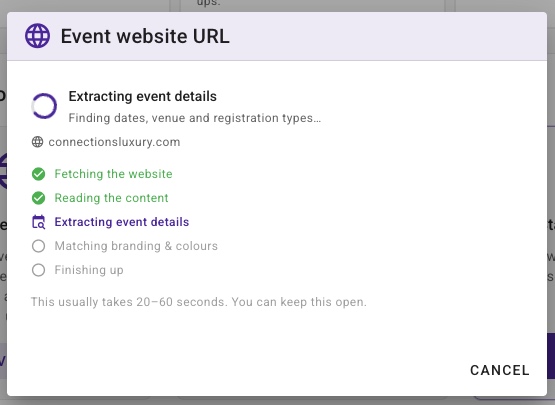
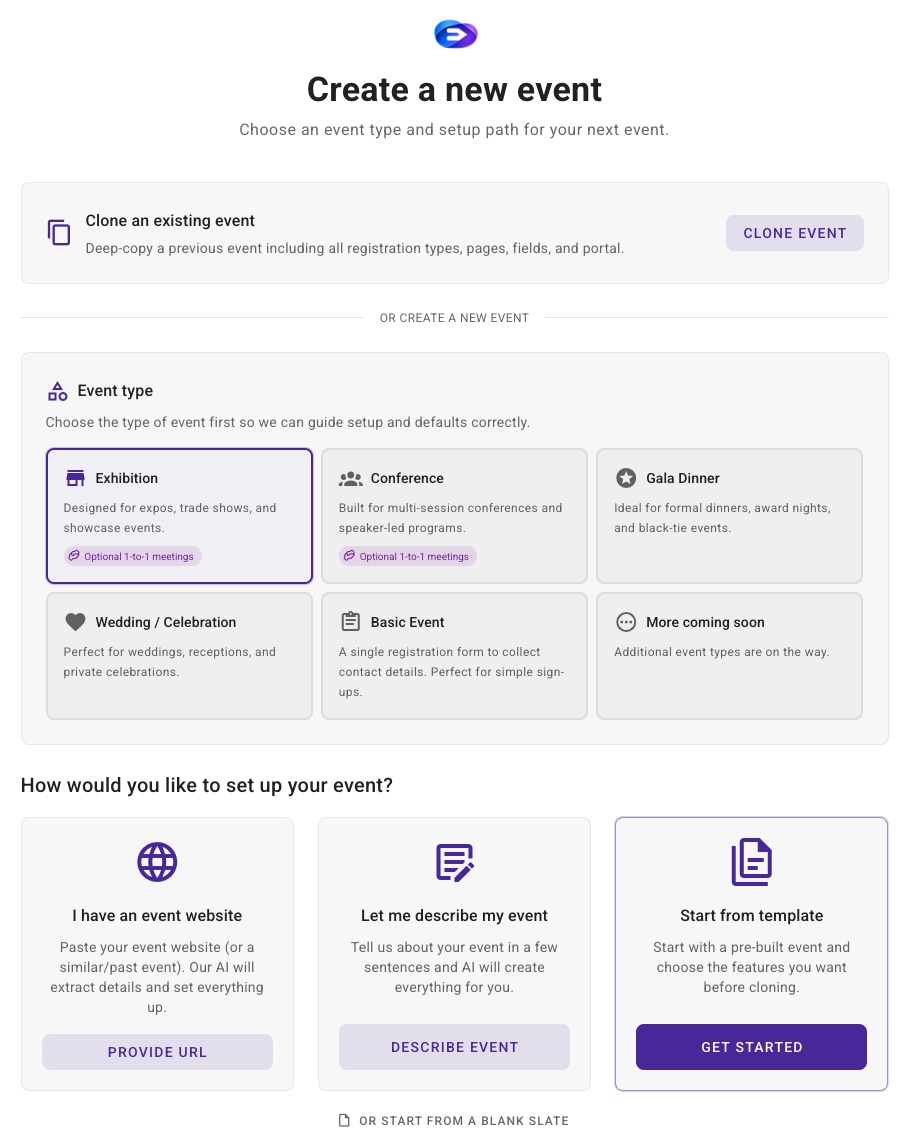
Describe your event, choose a recipe or paste a public event website. Guided Setup combines what you provide into one brief and asks for missing essentials.
2
Review your first version
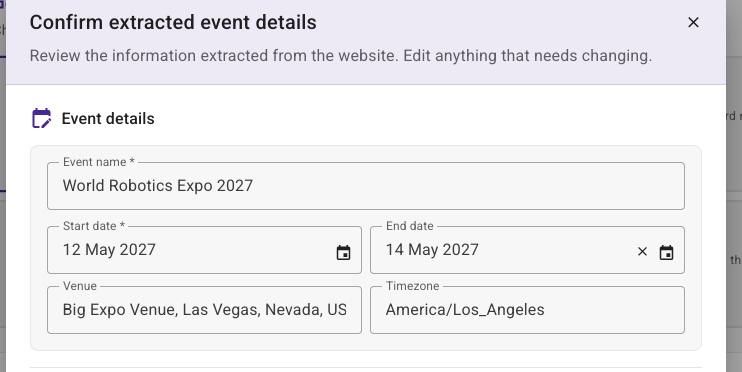
Review the brief, correct what is missing and create an editable first event and portal before signup. This is the start of setup, not the end.
3
Sign up and keep building
Use ChatGPT, Claude or the built-in assistant to configure registration, programme, networking and more. Keep the guided checklist to track setup, and review supported changes before they run.
The industry forces you to choose. We removed the choice.
Event software has always had two lanes. Both have trade-offs. EventGen created a third.
Enterprise Platforms
Cvent, Bizzabo, and similar
Request a demo, wait for a callback
Sit through multiple sales meetings
Negotiate pricing and sign a contract
Wait weeks for their team to set up your event
Pay £10k–£100k+ per year
Call support for every change
DIY Tools
Luma, Eventbrite, and similar
Sign up and figure it out yourself
Hours spent learning the tool
Limited features - basic registration only
No networking, no AI, no real portal
You outgrow it quickly
No support when things get complex
Different
EventGen
AI-powered, self-service
Start an event before signing up - no demo or sales call
Use a description or website URL for the editable first version
Core tools on Free, plus Networking Test Mode
Rehearse hosted-buyer and open networking before adding Engage
Upgrade when you need more - from your dashboard
No contract, no pressure - cancel anytime
See the AI at work
Ask for the outcome. EventGen handles the setup.
Use ChatGPT, Claude or EventGen’s built-in assistant to manage your event. These examples show the built-in assistant with real dashboard and attendee-portal captures.
Deterministic recreations based on real EventGen workflows and production captures. No customer data or live AI call is used here.
Core advantages
What actually sets EventGen apart.
Not incremental improvements - capabilities built from 20 years of running real events.
AI builds your entire event.
Work in ChatGPT, Claude or EventGen’s built-in assistant. Bring your brief, files or event data and ask for the setup you need. EventGen provides 300+ confirmed actions across registration, portal pages, audience filters, networking and communications; the tools available depend on your assistant and permissions.
Creates registration types, fields, and multi-step flows
Builds editable saved filters from complex plain-English requests
Builds and publishes portal pages with widgets and styling
Works with uploaded images, documents, and spreadsheets
Extracts event details from event's website URL
Networking and matchmaking, built in.
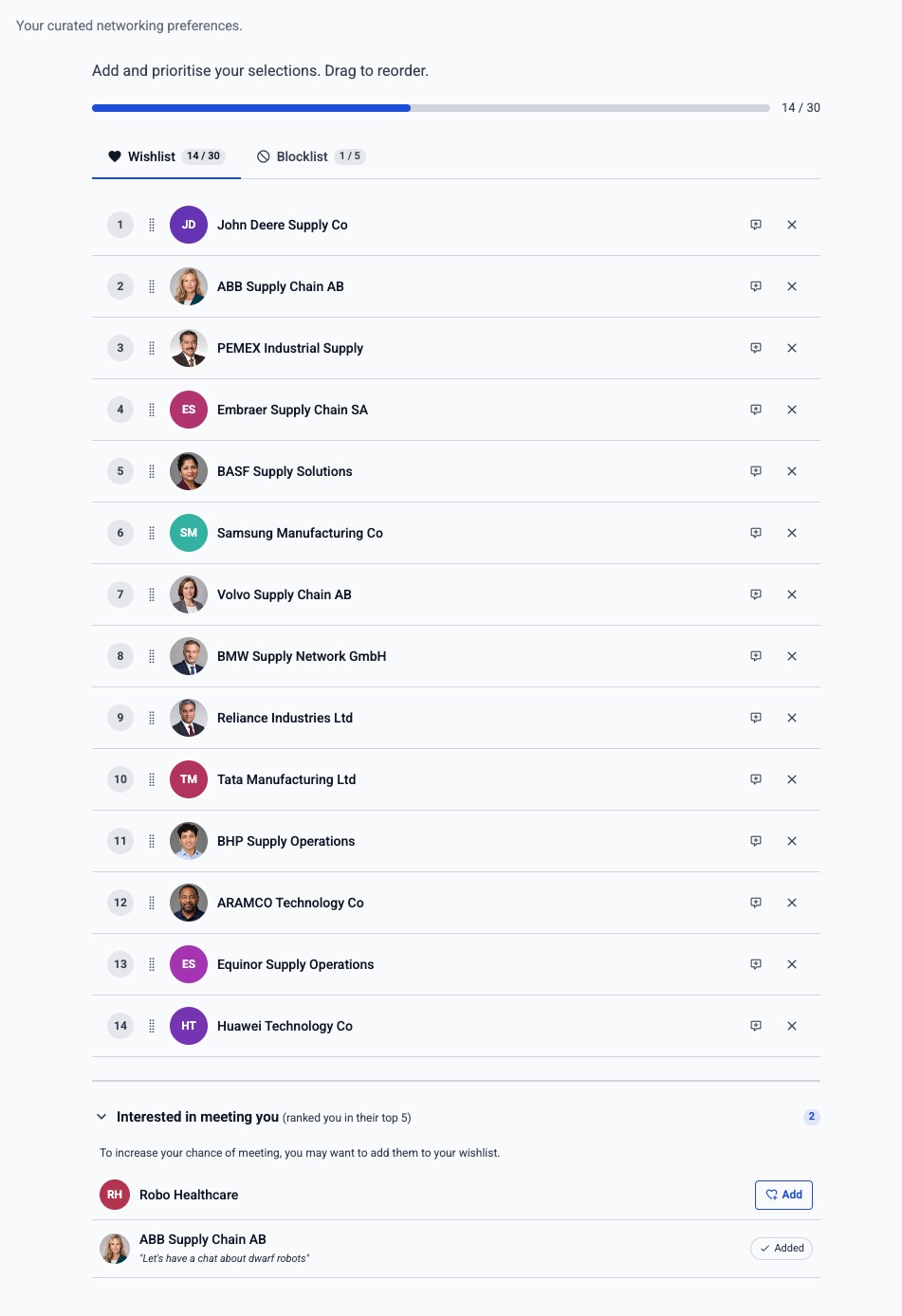
Open and curated networking in one engine. Attendees find relevant people and arrange one-to-one meetings themselves, or organisers run hosted buyer and B2B matchmaking programmes with meeting wishlists, algorithmic matching, preliminary review, and scheduled release. Team booths, What-If scheduling, and cross-field profile matching require no hardware badges or professional services.
Networking Test Mode - rehearse the Portal safely before registrants see it
Open: browse, request, direct-book, and reschedule one-to-one meetings
Team networking with booth concurrency and member assignment
What-If tool explains conflicts and suggests ranked fixes
Profile matching with cross-field option linking - not keyword guessing
Optional AI Intent Matchmaking for natural-language discovery and objective-led curation
Start early. Keep building with AI.
No demo or onboarding team needed. Start before signing up with your event website or a description. Review the initial event, then keep building with ChatGPT, Claude or the built-in assistant.
Start before signup with a website URL or event description
Review an editable first event and portal
Sign up to keep it and finish the detailed setup
Published self-service packages, with Enterprise+ available by custom Order
AI explains actions and asks for confirmation as you continue
Platform
Everything your event needs. Nothing it doesn't.
One platform - registration, programmes, networking, floor plans, sales CRM, communications, payments, a branded portal, and the event day itself.
Rehearse networking safely in Test Mode, then add Engage when you are ready to make it Live for attendees.
Paid prices exclude VAT and other applicable taxes.
Start here
Free
Core platform with Networking Test Mode.
£0
50 registrants/event
Up to 1 event place/calendar year
Networking Test Mode
About 24 AI responses/week*
Starter
Base £100 · Engage £200/mo
£100/mo
500 registrants/event
Up to 2 event places/calendar year
Bring your own domain
About 105 AI responses/week*
Pro
Base £250 · Engage £500/mo
£250/mo
1,000 registrants/event
Up to 6 event places/calendar year
Bring your own domain
About 262 AI responses/week*
Enterprise
Base £600 · Engage £1,200/mo
£600/mo
5,000 registrants/event
Up to 12 event places/calendar year
Bring your own domain
About 629 AI responses/week*
Enterprise+
Negotiated Order and quote.
Custom
Contract-specific limits
Contract-specific price
Dedicated support
Live networking included
* AI response estimates refer to EventGen’s built-in assistant. With ChatGPT, Claude or another compatible assistant, the conversation uses your own AI plan, so your EventGen allowance can go further. Actions that call EventGen’s AI services still count towards the shared weekly allowance. Your provider’s limits and EventGen plan limits apply.
Everything you need to know about EventGen. Can't find your answer? Email us.
Can I use EventGen from ChatGPT or Claude?
Yes. Connect your EventGen account through a supported MCP connection and confirm the event you want to work on. EventGen’s event management MCP server provides both read and write tools. Your assistant can read event data, compare editions and prepare reports, then create or update supported forms, products, sessions and other setup after approval. Review the exact saved proposal, then explicitly approve or reject in chat or by voice; optional review controls and detailed browser review are also available. The dashboard AI assistant remains available too.
Do prices include VAT or other taxes?
Paid subscription and Lead Retrieval prices exclude VAT and other applicable taxes. Applicable tax is payable in addition to the displayed base price and depends on your billing location and tax status, not whether you pay in GBP, EUR or USD. Your total, including applicable taxes, must be confirmed before you purchase.
Can I make a paid purchase from the EU?
Paid subscriptions and Lead Retrieval purchases are currently available in EU countries only to businesses with a verified EU VAT number. EU consumer purchases are temporarily unavailable; the Free plan remains available. Eligible EU business purchases use reverse charge where applicable, with the final tax treatment shown before purchase.
Can I create an event before signing up?
Yes. Start in public AI Guided Setup without an account. Paste a public event website, describe your event or choose a recipe, review the details AI finds, and create an editable first event and portal. A new account with no existing events can choose to keep that public preview after signup or login. Then continue detailed registration, payment, networking, communication, and publishing setup.
Do I need an event website to start?
No. A website can give Guided Setup a useful starting point for event identity, dates, location, branding, and published programme details. If you do not have one, describe your event or choose a recipe instead. Either way, the initial setup needs review and can be edited later.
What does AI Guided Setup help with after signup?
The public flow creates a first event and portal. After signup, Guided Setup continues across dozens of selectable areas, including registration types and forms, programme and speakers, networking, portal design, tickets and payments, communications, exhibitor setup, onsite operations and launch review. Its checklist tracks real setup, identifies unfinished work and lets you defer unknown details. The AI Assistant helps with supported actions and reviews; manual and external steps stay clearly identified, and proposed changes require confirmation.
What is EventGen?
EventGen is an AI-powered event management platform. Describe your event - or paste your website URL - and AI builds your registration, attendee portal, networking, and communications automatically. Free, Starter, Pro, and Enterprise are self-service; Enterprise+ uses a negotiated Order.
Is there a free plan?
Yes. Free is £0 and supports up to one event place per calendar year and 50 unique registrants per event. It includes core EventGen capabilities within its allowances plus bounded Networking Test Mode for organiser-only rehearsal. No credit card is required to start.
Can I use EventGen for a wedding or private event?
Yes. EventGen is available to individuals and organisations for professional, community, and personal events, including weddings and private celebrations. The same plans, prices, features, and capacity rules apply; there is no separate personal or business tier, and ordinary signup does not ask you to classify yourself.
Can a consumer cancel a paid subscription within 14 days?
Yes. A Consumer who purchases a paid self-service subscription online may cancel within 14 days for a full refund under the EventGen Terms of Service. Email support@eventgen.ai before the period expires and clearly state that you wish to cancel. EventGen will end the paid subscription and return the account to Free without deleting its content.
How much does EventGen cost?
There are five tiers: Free (£0), Starter (Base £100/month; Engage £200/month), Pro (Base £250/month; Engage £500/month), Enterprise (Base £600/month; Engage £1,200/month), and bespoke Enterprise+. Billing is available in GBP, USD, and EUR; annual payment is ten times the corresponding local monthly price.
Does EventGen take a commission on ticket sales?
No. EventGen takes 0% commission on attendee payments. Payments go directly to your connected Stripe account, so EventGen does not hold your ticket revenue or pay it out later. Standard Stripe processing fees and Stripe's payout schedule still apply.
Do I need a demo or a sales call?
Not for Free, Starter, Pro, or Enterprise: sign up and buy from the dashboard. Enterprise+ is individually quoted and uses a versioned Order.
How does AI usage work with ChatGPT or Claude?
AI response estimates refer to EventGen’s built-in assistant. With ChatGPT, Claude or another compatible assistant, the conversation uses your own AI plan, so your EventGen allowance can go further. Actions that call EventGen’s AI services still count towards the shared weekly allowance. Your provider’s limits and EventGen plan limits apply.
What can I do with ChatGPT, Claude or the built-in assistant?
Use ChatGPT, Claude, another compatible MCP assistant or EventGen’s built-in assistant to work on your event. EventGen provides 300+ confirmed actions across registration, forms, portal pages, networking and communications. Your assistant can interpret your brief and data, prepare reports and propose supported changes for your review. Available tools, file handling and connected sources depend on the assistant you choose and your permissions.
Can I upload files to the EventGen AI assistant?
Yes. EventGen's dashboard AI assistant is multimodal, so you can upload images, documents, or spreadsheets and ask it to use their contents while helping you configure your event. The assistant remains context-aware across the dashboard, and every executable action is presented for confirmation before it runs.
Can EventGen's AI build complex audience filters from plain English?
Yes. Describe the registrants or contacts you need and the AI Filter Builder checks the fields and operators available for the current event, resolves event-specific values such as registration types and sessions, and proposes transparent, editable saved-filter rules for confirmation. It can combine supported registration and contact data, progress status, dates, custom fields, products, payments, and session selections with AND/OR groups, comparisons, inclusions, and exclusions. Saved filters stay dynamic and can be reused across registrant views, Campaigns, reports, and exports. If a requested criterion is not available in the current filter metadata, the assistant says so rather than inventing it.
Does EventGen support hosted buyer and B2B networking?
Yes. EventGen includes hosted buyer programmes, curated B2B matchmaking, meeting wishlists, one-to-one appointment scheduling, and open attendee networking in one platform. Non-Engage plans provide bounded Networking Test Mode for trusted organiser rehearsal without exposing networking to real registrants. Engage enables attendee-facing Live networking, and Enterprise+ includes networking.
How is EventGen different from Cvent, Bizzabo, or Eventbrite?
EventGen combines self-service setup with registration, portals, AI-assisted configuration, communications, Networking Test Mode, and optional attendee-facing Live networking through Engage. You can start free and purchase the published Starter, Pro, or Enterprise packages in the dashboard; Enterprise+ is custom quoted.
Does EventGen handle on-site check-in and exhibitor lead retrieval?
Yes. EventGen Onsite is the companion app for your event-day staff - venue and session check-in, offline badge printing, meeting verification, and a self-service kiosk mode, all syncing live to your dashboard. Lead Retrieval is a separate app exhibitors run on their own phones to scan attendee badges, rate and tag leads, and export them to Excel. Lead Retrieval is purchased per event as packs of activation slots from your dashboard - it is not part of the platform plans, and every event includes 2 free activation slots on every plan (including Free) to test before buying.
Can I use my own branding and custom domain?
Yes on paid plans. The visual portal builder creates fully branded attendee sites, and Starter through Enterprise+ can serve them on your own domain with automatic SSL (for example, your-event.yourbrand.com). Free uses an EventGen domain.
How does EventGen support GDPR compliance and security?
EventGen provides GDPR-aligned contractual, technical and organisational safeguards, including a Data Processing Agreement and published sub-processor information. Customers remain responsible for their own controller obligations and configurations. EventGen is a product and trading name of Evengage Ltd, a company registered in England and Wales (number 16480174).
Start your event now. Keep building together.
Use your event website or describe what you have in mind. Review an editable first version before signing up, then keep building with ChatGPT, Claude or the built-in assistant.
 ChatGPT